Page 76 FTDX1200 Operating Manual

TRANSMITTER CONVENIENCE FEATURES Cont'd

Previous Page    Index of Topics    Table of Contents    Index of Pages    Next Page

SPLIT FREQUENCY OPERATION

A powerful capability of the FTDX1200 is its fexibility in Split Frequency operation using the VFO-A and VFO-B frequency registers. This makes the FTDX1200 especially useful for high-level DX-peditions. The Split operation capability is very advanced and easy to use.

    1. Rotate the Main Tuning Dial knob to set the desired RX frequency.

    2. Press the [A ►◄ B] button, then rotate the Main Tuning Dial knob to set the desired split TX frequency.

    3. Press the [A ►◄ B] button, then press the [SLIT] button. The VFO-B frequency will appear in the TFT display and the LED indicators will look like as below:

VFO-A RX Indicator: "ON" (LED glows Green)

VFO-A TX Indicator: "OFF" (LED Off)

VFO-B RX Indicator: "OFF (LED Off)

VFO-B TX Indicator: "ON" (LED glows Red)
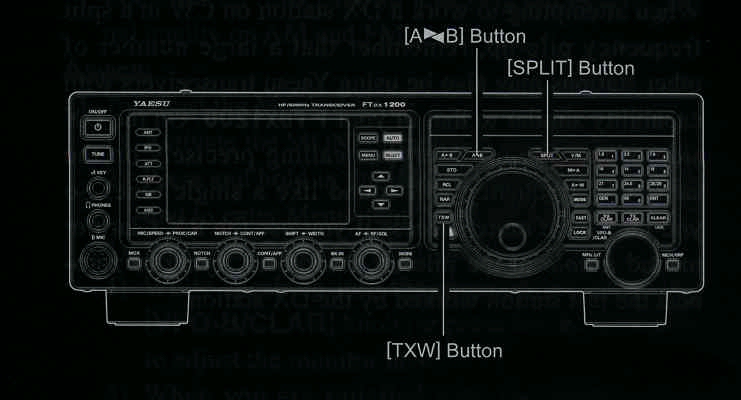

During Split operation, the VFO-A register will be used for reception, while the VFO-B register will be used for transmission. If you press the [SPLT] button once more, Split operation will be cancelled.

ADVICE:

During the Split operation, pressing the [A ►◄ B] button will reverse the contents of the VFO-A and VFO-B. Press the [A ►◄ B] button once more to return to the original frequency alignment.

During Split operation you may listen to the TX frequency temporarily while pressing the [TXW] button located on the botton left of the Main Tuning Dial knob.

While pressing the [TXW] button during split operations, the frequency on the transmission side can be changed. Using the Menu item "044 TXW DIAL SELECT", the knob used for changing the frequency can be set.

When setting VFO-A: Main Tuning Dial knob.
When setting VFO-B: [VFO-B/CLAR] knob.

It is possible to set different operating modes (for example. LSB and USB) on the two VFOs used during Split operation.

During Split operation it is also possible to set VFO-A and VFO-B to different Amateur bands if you use a multi band antenna.


Quick Split Operation

The Quick Split feature allows you to set a one-touch offset of +5kHz to be applied to your radio's VFO-B (transmit) frequency, compared to the VFO-A frequency.

    1. Start with regular transceiver operation.
VFO-A RX Indicator: "ON" (LED glows Green)

VFO-A TX Indicator: "ON" (LED glows Red)

VFO-B RX Indicator: "OFF (LED Off)

VFO-B TX Indicator: "OFF" (LED Off)

    2. Press and hold in the [SPLIT] button for one second to engage the Quick Split feature, and apply a frequency of 5 kHz above the VFO-A frequency to the VFO-B frequency register.
The VFO configuration will then be:
VFO-A RX Indicator: "ON" (LED glows Green)

VFO-A TX Indicator: "OFF" (LED Off)

VFO-B RX Indicator: "OFF (LED Off)

VFO-B TX Indicator: "ON" (LED glows Red)
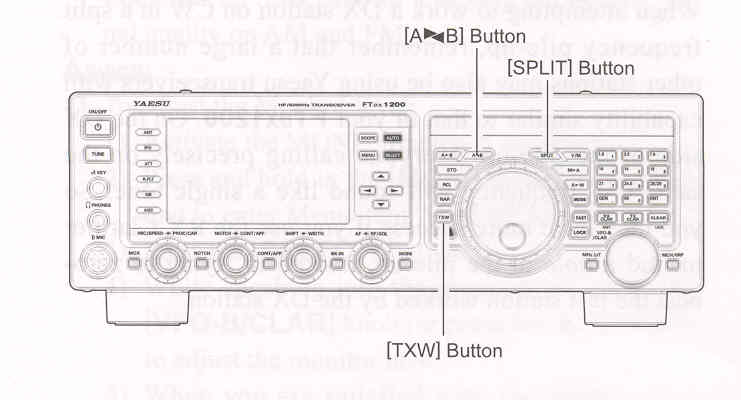
    3. Press and hold in the [SPLIT] button for one second to increment the sub (VFO-B) frequency another + kHz.

QUICK POINTS:

The operating mode applied to the VBO-B register will be the same as that in use on the VFO-A register.

The offset of VFO-B from VFO-A is programmed via the Menu and is set to + 5 kHz at the factory. However, other offsets may be selected using the following procedure.

    1. Press the [MENU] to engage the Menu mode.

    2. Rotate the [VFO-B/CLAR] knob (or press the ▲ / ▼ button) to select Menu item "043 QUICK SPLIT FREQ".

    3. Press the [SELECT] button, then rotate the [VFO-B/CLAR] knob (or press the ▲ / ▼ button) to select the desired offset. The available selections are -20 kHz ~ +20 kHz (factory default: +5 kHz).

    4. Press the [SELECT] button, then press the [MENU] button to save the new setting and exit to normal operation.


End of "Split Frequency Operation"

End of "Transmitter Convenience Features"

Previous Page    Index of Topics    Table of Contents    Back to Top    Index of Pages    Next Page

Page 76 FTDX1200 Operating Manual